
Cloud storage buckets are consistently one of the most widely used services in the Google Cloud Platform (GCP). However, many organizations relying on them remain unaware of a critical architectural flaw they may be vulnerable to: Bucket Squatting.
This guide explains what bucket squatting is, how to fix it in your internal workflows, and even how to preemptively mitigate bucket squatting related zero-days in Google itself.
In GCP, all organizations share a single, globally unique namespace for bucket names. Once a bucket name is taken, no one else can own it - for that reason, you won’t be able to create a bucket with the name gs://test.
If an attacker can guess the bucket naming convention an organization intends to use, they can pre-claim, or “squat” it. If a workload of the organization later attempts to write data to that bucket without verifying who owns it, they will end up writing it to the attacker’s squatted bucket.
Let’s look at the following pseudocode script of a vulnerable service:
bucket_name = 'gs://my-org-{now.year}-{now.month}'

if not bucket.exists(bucket_name):
    bucket.create(bucket_name)

bucket.upload(bucket_name, log_file)
The script uses a predictable naming convention: gs://my-org-[year]-[month]. If it sees that the bucket does not exist, the workload will create it. Either way, the logs are uploaded to the bucket.
If an attacker targeting this service recognized the pattern being used, they could create the bucket gs://my-org-2026-03 in February. Come March, the victim’s workload will follow the set pattern and check if gs://my-org-2026-03 exists. Because it does, it proceeds to dump logs into the bucket, without knowing it’s owned by the attacker:
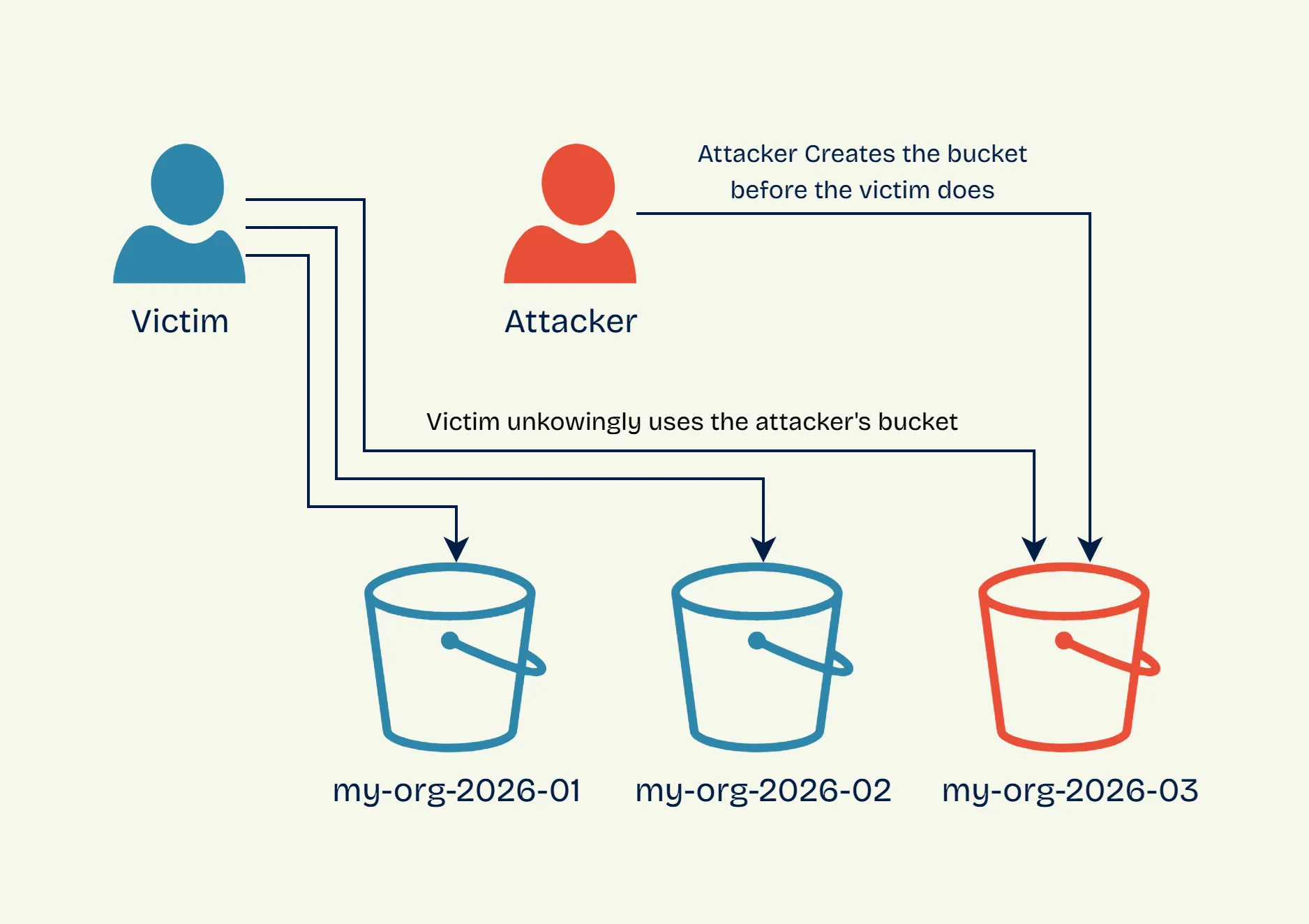
This could have been avoided if the workload verified ownership of the bucket, or used any of the mitigation techniques highlighted in the following section of this article.
The prerequisites for bucket squatting are:
To permanently resolve bucket squatting risks, organizations must adopt a defense-in-depth approach that combines strict naming conventions, careful lifecycle management, and rigid network boundaries.
Domain-named buckets are formatted using a registered domain (e.g., logs-xxx.myorg.com). Google requires users to verify ownership of the domain via Google Search Console before creating the bucket.
This verification process acts as a strict safeguard. If we examine the previous bucket squatting example where the pattern is instead logs-[year]-[month].myorg.com, we will see that an attacker cannot preemptively create logs-2026-03.myorg.com because they cannot prove ownership of myorg.com to Google.
If attackers can’t guess the name, they can’t squat it. The most reliable way to enforce unpredictability at scale is by appending random suffixes using Infrastructure as Code (IaC) tools.
The following Terraform snippet demonstrates how to automate this:
# Create a sufficiently random suffix
resource "random_id" "bucket_suffix" {
  byte_length = 8
}

# Create the bucket with the random suffix
resource "google_storage_bucket" "function_bucket" {
  name                        = "gcf-bucket-${random_id.bucket_suffix.hex}"
  location                    = "US"
  uniform_bucket_level_access = true
}

# Pass the bucket name as an env variable to a service (e.g., Cloud Function)
resource "google_cloudfunctions_function" "function" {
  # ... other configuration ...
  environment_variables = {
    MY_BUCKET_NAME = google_storage_bucket.function_bucket.name
  }
}Buckets are often used as log sinks and temporary storage by automated workloads, and it’s easy to lose track of which bucket is used where, and which one is no longer needed.
When deleting a bucket that is still referenced by a workload, its name becomes available, allowing an attacker to register it and capture all the data written to it.
Instead of deleting unused buckets, empty their contents and leave them active within your GCP project. This holds the namespace and stops attackers from hijacking them.
VPC Service Controls allow you to draw rigid security perimeters around your GCP resources, enforcing strict access policies that prevent unauthorized data transfers between your environment and the outside world.
This feature offers great preemptive defense against bucket squatting. By configuring a perimeter that restricts your workloads to only communicating with storage buckets inside the perimeter, you stop the attack vector entirely.
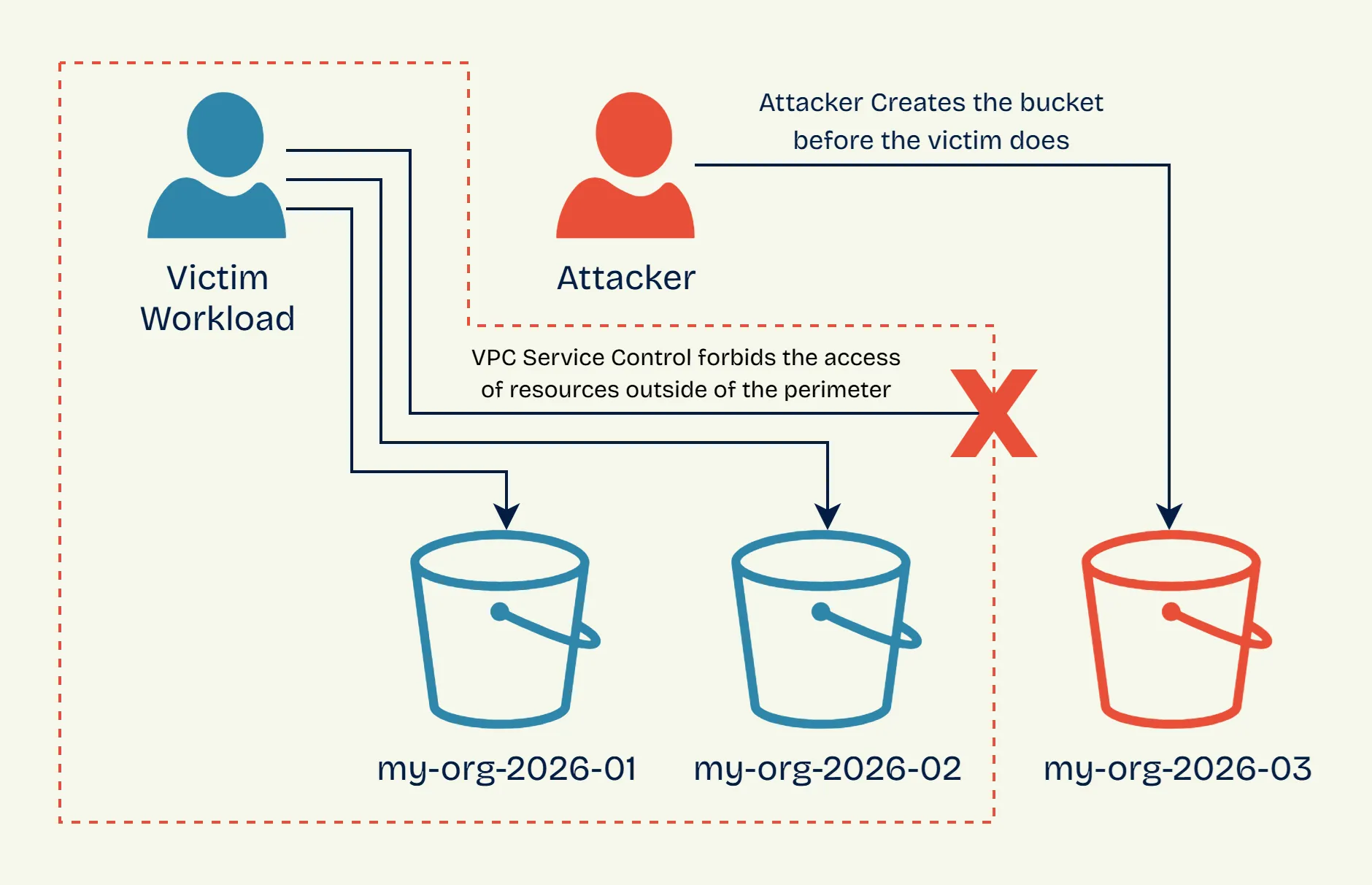
Even if an attacker successfully squats your target bucket name, the exploit fails. When your workload attempts to write data to the external, attacker-owned bucket, the VPC perimeter immediately drops the egress traffic.
Follow these instructions to set up a perimeter capable of protecting against bucket squatting. Before applying to an active project, use a test project and test your perimeter in dry-run mode to catch unintended blocks before they affect production.
Start by checking if your organization already has an access policy. If not, create one:
gcloud access-context-manager policies create \
    --organization=<ORG_ID> \
    --title bucket_squatting_block \
    --scopes=projects/<PROJECT_NUMBER>
Then list policies to find the policy ID you’ll need:
gcloud access-context-manager policies list --organization=<ORG_ID>Next, create the permissive ingress policy file ingress.yaml:
- ingressFrom:
    identityType: ANY_IDENTITY
    sources:
    - accessLevel: "*"
  ingressTo:
    operations:
    - serviceName: storage.googleapis.com
      methodSelectors:
      - method: "*"
    resources:
    - "*"
This policy allows all ingress communication because bucket squatting only affects egress communication - i.e., a workload WITHIN the perimeter trying to access a bucket OUTSIDE the perimeter.
Now create the perimeter with just the ingress policy:
gcloud access-context-manager perimeters create squatting_protection_perimeter \
    --title="GCS Bucket Squatting Protection" \
    --description="Blocks internal workloads from accessing external buckets" \
    --perimeter-type=regular \
    --policy=<POLICY_ID> \
    --resources=projects/<PROJECT_NUMBER> \
    --restricted-services=storage.googleapis.com \
    --ingress-policies=ingress.yaml
This blocks all outbound GCS access by default, which is the core protection against bucket squatting.
If your workloads need to access GCS buckets in other projects, you’ll need to add an egress policy to explicitly allow those connections. Create an egress policy file egress.yaml:
- egressFrom:
    identityType: ANY_IDENTITY
  egressTo:
    operations:
    - serviceName: storage.googleapis.com
      methodSelectors:
      - method: "*"
    resources:
    - projects/<WHITELISTED_PROJECT_NUMBER>
Then update your perimeter to include the egress policy:
gcloud access-context-manager perimeters update squatting_protection_perimeter \
    --policy=<POLICY_ID> \
    --egress-policies=egress.yaml
Only add the egress policy if you have a legitimate need to access external buckets. The perimeter’s core protection works without it.
Many managed GCP services, like Dataproc and App Engine, provision and use internal storage buckets behind the scenes.
Focal Security recently found three critical Bucket Squatting zero-days in major GCP products: GeminiSquat (CVE-2026-1727), VertexSquat (CVE-2026-2473), and MountSquat. These flaws exposed organizations to severe cross-tenant data breaches and even remote code execution.
While Google works to implement internal protections, vendors occasionally overlook bucket squatting safeguards. If a managed service uses a predictable bucket name without implementing bucket ownership checks, you become vulnerable—unless you have locked down your cloud posture. This is where VPC Service Controls shines.
Managed products attached to your GCP project are automatically encompassed by your service perimeter. If a zero-day flaw exists inside a managed GCP product that attempts to route data to an attacker’s squatted bucket, your VPC perimeter will block the connection. The exploit fails before the data ever leaves your environment.
Bucket squatting is a high-impact, low-complexity exploit that takes advantage of the global namespace of cloud storage. It’s extremely dangerous because it requires no prior access to your infrastructure.
You can lock down your cloud posture against these cross-tenant threats by adopting the following strategy:
After deploying these mitigations, your cloud infrastructure should be safe from bucket squatting vulnerabilities.
Cross-tenant flaws allow attackers to achieve massive impact without prior access to your organization. Focal Security helps you design resilient architectures to prevent that from ever happening.